



Related articles and resources
- KB-LJW-DB-104 : Handle "DATE" datatypes with MySQL and MariaDB
- KB-LJW-DB-105 : Connect to MariaDB databases via ADO + ODBC
ADO / OLE DB / ODBC architecture in Classic ASP
The data access architecture in ASP is as follows:
| Component | Type | Examples |
|---|---|---|
| 1. ASP application | Functional logic | *.asp files |
| 2. ADO | Data access API | N/A (standardized library) |
| 3. OLE DB | Provider / adapter | Provider=MSDASQL;Provider=Microsoft.ACE.OLEDB.12.0;Provider=SQLOLEDB; |
| 4. ODBC | Driver / driver | Driver={MariaDB ODBC 3.2 Driver};Driver={MySQL ODBC 5.1 Driver}; |
| 5. Data | File or Database Engine | MariaDB Server 11.4 Microsoft SQL Server *.mdb file *.xlsx file |
Role of each layer
- 1. ASP application
The source code of the ASP scripts describes the functional logic of your application. - 2. ADO
The ActiveX Data Objects API is the programming interface on the ASP side that links the ASP source code and the OLE DB Provider. - 3. OLE DB Provider
The Provider is an adaptation layer between ADO and the underlying data access layer, whether the latter is an ODBC Driver or a native interface. It standardizes exchanges between ADO and this access layer. - 4. ODBC Driver
The ODBC Driver is the component that actually communicates with the database and returns the data to the OLE DB Provider. It is specifically designed for the targeted database format/type, and generally provided by the designer of the database engine. - 5. Database
This is the database system / server / file that actually contains your data. It is queried by the ODBC Driver when the connection string usesProvider=MSDASQLor does not specify any OLE DB provider. It is queried via a native OLE DB provider when the connection string explicitly specifies aProvider=different fromMSDASQLand no ODBC parameter (Driver=orDSN=) is used. In the latter case, communication is performed directly via the client library or the native protocol of the database management system, without going through the ODBC layer.
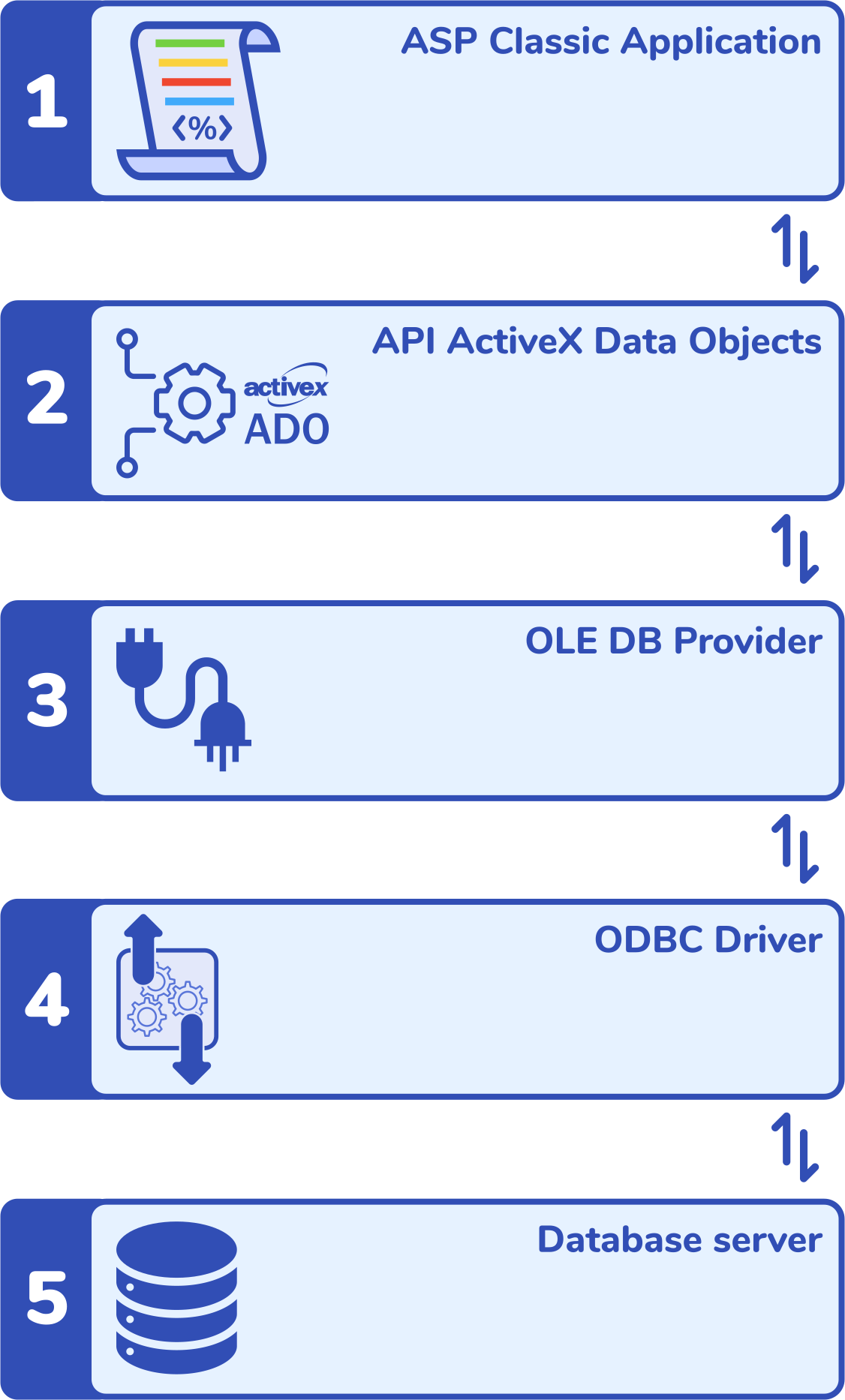
Overview
ADO always uses an OLE DB Provider, which is the software component implementing the OLE DB interface that allows an application using ADO to access a data source.
ADO never communicates directly with a database or with ODBC: it always relies on an OLE DB Provider, which acts as the technical intermediary between ADO and the underlying data access system.
Depending on the nature of the connection string, the OLE DB provider used varies. When the connection string is ODBC-type (presence of Driver=, Dsn=, or Provider=MSDASQL), the implicitly used OLE DB Provider is MSDASQL ("OLE DB Provider for ODBC"). In this case, MSDASQL translates the OLE DB calls issued by ADO into ODBC calls, understandable by the targeted ODBC driver (MySQL, MariaDB, MS SQL Server, MS Access, MS Excel, etc.).
Conversely, when the connection string makes no reference to ODBC (absence of Driver= or Dsn=), ADO then uses a native OLE DB Provider, specifically designed for the database engine concerned (for example SQLOLEDB, MSOLEDBSQL, etc.), without going through ODBC or MSDASQL.
MSDASQL ("OLE DB Provider for ODBC") is used implicitly only if the connection string is ODBC-type (that is, presence of Dsn=, or Provider=MSDASQL). In the absence of Provider= and ODBC parameters, ADO does not automatically inject Provider=MSDASQL.
In summary, the OLE DB Provider can be specified explicitly via Provider= in the connection string. Otherwise, ADO deduces the provider to use from the format of the connection string: when it is ODBC-type (presence of Driver= or Dsn=), the implicitly used provider is MSDASQL.
ADO layer
ADO (ActiveX Data Objects) is a data access library from Microsoft used by Classic ASP to manipulate databases. It is a lightweight abstraction layer above OLE DB allowing applications (notably Classic ASP and VBScript) to connect to heterogeneous data sources, execute queries, and manipulate results via a uniform API made up of objects such as Connection, Command, and Recordset.
ADO is therefore the software layer that creates Connection or Recordset objects, applies the CursorType properties, calls the .Open(), .Execute(), .MoveNext(), .MoveLast() methods, and manages/returns the RecordCount property.
ADO is not a driver; it does not know how to speak directly to the MySQL, MariaDB, Microsoft SQL Server, or MS Access server. When an ASP script queries a database, ADO forwards the query to the OLE DB Provider you specified in your connection string, which may communicate with the ODBC driver if you specified one via Driver=. This driver is the system component responsible for actually communicating with the database server.
OLE DB layer
OLE DB is the adaptation layer between ADO and the data access layer, the latter being either an ODBC Driver or a native Provider. The role of OLE DB is to standardize exchanges between ADO and this data access layer. OLE DB Provider for ODBC (MSDASQL) is a provider supplied by Microsoft that serves as a bridge between ADO and ODBC drivers when the connection string targets an ODBC Driver through the presence of Driver=.
Its use is either explicit via the Provider= instruction in your connection string, or implicitly Provider=MSDASQL by default if it is not specified AND your connection string refers to an ODBC Driver specified by means of the Driver= parameter. In other words, if Provider= is absent from your connection string but an ODBC driver is required through the presence of Driver=, ADO then implicitly uses MSDASQL in the background to communicate with the ODBC Driver. This mechanism allows backward compatibility with ODBC connection strings.
Always remember that ADO does not speak directly to ODBC: when an ASP script uses a connection string with Driver=, ADO goes through MSDASQL, which translates ADO's OLE DB calls into ODBC calls understandable by the driver (MySQL, MariaDB, etc.).
ODBC layer
The ODBC Driver is the low-level component that actually communicates with the database. Therefore, when ADO is used via an OLE DB provider for ODBC (MSDASQL), the latter forwards its requests (queries, cursors, locks) to the ODBC driver, which is responsible for applying or adapting them according to its capabilities
Each ODBC Driver is designed by a different vendor and is adapted to the capabilities and features provided by the targeted database engine. This explains the sometimes different behaviors that can be observed with identical source code, but a different database engine, or a different ODBC Driver, or even a different version of a series of ODBC Drivers, despite strictly identical ADO calls upstream.
ADO cursor types
In ADO, cursor types (0=Forward-Only, 3=Static, 1=Keyset, 2=Dynamic) define how a Recordset is traversed and maintained in ASP-side memory, or in the database server memory. These cursor types therefore have a direct impact on performance, memory consumption, and the features available to your Recordset.
The choice of cursor therefore determines the ability to move through the Recordset, count rows, see concurrent changes, and handle load on the server or client side. Mastering ADO cursors is therefore essential.
The ADO cursor types are as follows:
- 0 = adOpenForwardOnly (default):
The Forward-Only cursor is the fastest and lightest, but it only allows sequential reading. - 1 = adOpenKeyset:
The Keyset cursor allows you to see changes to other existing records, except for new rows. - 2 = adOpenDynamic:
The Dynamic cursor reflects all changes in real time. This makes it the most expensive cursor. - 3 = adOpenStatic:
The Static cursor loads a fixed snapshot of the data, allowing free navigation within the recordset but at the cost of high memory usage.
Official Microsoft documentation:
Impact of the ADO cursor type
Beyond performance or memory usage considerations, the main criterion when choosing a cursor is how you intend to traverse it. You must choose between the following two options:
- "Am I going to read this recordset straight through forward?" (non-scrollable cursor),
- OR
- "Do I need to be able to count records, sort, filter, go backward?" (scrollable cursor).
The ADO cursor type you use when accessing a Recordset largely determines the possibilities offered to your code for traversing and manipulating the data. The 0=adOpenForwardOnly cursor type is the one used by default when you use the rs.Open() method without specifying the rs.CursorType property, or when you use the dbConn.Execute() method.
When your Recordset is opened without explicitly specifying the cursor type, and depending on the size of the data returned by your query on the one hand, and the ODBC Driver used downstream on the other hand, there is a risk that the ODBC Driver may sometimes decide:
- either to execute a real server-side Forward-Only cursor,
- or to simulate this behavior client-side (buffering).
It is important to note that ADO defines an intention, but that it is always the ODBC Driver that decides downstream the reality of the cursor it will use.
The ODBC Driver indeed remains free to implicitly choose a cursor type other than the one you specified if it deems it necessary, this being within the official specifications of the ADO standard.
This kind of situation is generally uncommon, or not problematic: the ODBC Driver generally respects the requested cursor, but some ODBC Drivers emulate a server cursor in certain cases, which may cause significant memory consumption on large datasets.
How to take advantage of ADO cursors in ASP?
PHP is not affected by ADO + ODBC
If your site includes PHP pages that access MySQL or MariaDB databases, be aware that they almost never use ODBC by default, unless you have explicitly coded them that way in specific situations. Your PHP pages generally connect to your databases through one of the following methods:
- mysqli
- pdo_mysql
- mysqlnd (native driver)
- PDO with native MySQL driver
Connections to PHP are therefore generally made without using the ADO layer via a COM component, for example:
<?php
$user = 'testUser';
$pass = 'testPassword';
$pdoConn = new PDO('mysql:host=localhost;dbname=TestDB', $user, $pass, [
    PDO::ATTR_ERRMODE            => PDO::ERRMODE_EXCEPTION,
    PDO::ATTR_DEFAULT_FETCH_MODE => PDO::FETCH_ASSOC,
]);

$sqlStmt = $pdoConn->prepare('SELECT * FROM users WHERE field_1 = :field_1');
$sqlStmt->execute(['field_1' => $_GET['field_1']]);
$result = $sqlStmt->fetch();
?>
PHP can use ADO via COM (only on Windows) in legacy Windows/ADO contexts or for very specific needs. These connections are called as follows:
<?php
$conn = new COM("ADODB.Connection");
$conn->Open("Provider=MSOLEDBSQL;Server=localhost;Database=TestDB;Trusted_Connection=Yes;");
?>
ASP.NET is not affected by ADO + ODBC
If your site includes pages executed by the ASP.NET platform to access MySQL or MariaDB databases, be aware that they do not use ADO, but ADO.NET. Your .NET pages generally connect to your databases through one of the following methods:
- Native ADO.NET (
SqlConnection,SqlCommand,SqlDataReader,DataSet) - Entity Framework (EF / EF Core)
- Dapper
- NHibernate
CursorType for reliable and predictable code
When you access data via ADO and an ODBC Driver (or a native OLE DB Provider), you want to make sure that your ASP code works correctly without generating a server error (HTTP 500). Some permissive practices have historically been used in Classic ASP development, sometimes leading to runtime errors or causing different behaviors depending on the OLE DB Provider or ODBC Driver used (or even its version installed on the hosting server).
ADO is a static, reliable, and predictable interface, included with Windows + IIS. Your ASP sites can therefore rely on it.
By contrast, OLE DB Providers and ODBC Drivers evolve periodically. Those you use or have used in the past to access data via ADO may behave differently depending on the database engines or Provider/Driver versions. This can lead to situations where the same source code causes errors on some servers or with some Drivers, and not with others.
To make your Classic ASP code reliable and future-proof when it accesses data via ADO, regardless of the ODBC Driver used, your code should ideally be developed according to the following best practices. These consist in correctly explicitly specifying cursor types in your ASP code, in order to obtain predictable results and features on your Recordset.
Compatibility of ADO features by Cursor
This table presents the main authorized and discouraged ADO methods and properties according to each ADO cursor type (CursorType).
| ADO Method / Property | 0=Forward-Only (default) | 3=Static | 1=Keyset | 2=Dynamic |
|---|---|---|---|---|
| MoveNext | Yes | Yes | Yes | Yes |
| MoveFirst | No | Yes | Yes | Yes |
| MoveLast | No (or behavior not guaranteed) | Yes | Yes | Yes |
| MovePrevious | No | Yes | Yes | Yes |
| AbsolutePosition | No | Yes | Yes | Yes |
| PageSize / PageCount / AbsolutePage | No | Yes | Yes | Yes |
| RecordCount | Unusable (returns -1) | Reliable | Reliable | Reliable |
| Bookmark / Supports(adBookmark) | No | Yes | Yes | Yes |
| Sort | No (causes client-side switching) | Yes (client-side stable) | Yes | Yes |
| Filter | No (causes client-side switching) | Yes | Yes | Yes |
| Edit (Update, AddNew, Delete) | No (Read-Only) | Yes (but snapshot) | Yes (visible rows) | Yes (reactive) |
| See new rows inserted after opening | No | No | No | Yes |
| Concurrent data stability | Very high (fixed stream) | High (snapshot) | Medium | Low |
All cursor types, including the CursorType 0=adOpenForwardOnly, allow you to use the following methods and properties:
- BOF
- EOF
- MoveNext
- Fields
- Fields.Item
- Fields.Item("fieldname").Value
- GetRows
- GetString
- State
- ActiveConnection
- Source
- CursorType (retourne 0)
- CursorLocation
- LockType
- CacheSize
- MarshalOptions
Tips for reliable Classic ASP code with ADO + ODBC
Use CursorType=0 (adOpenForwardOnly) for simple reads of a Recordset
Your Recordset is opened in "0=Forward-Only" mode when:
- either when you use the
dbConn.Execute()method - or when you use the
rs.Open()method without having previously specified the cursor type in thers.CursorTypeproperty. ADO then uses the default cursor type, namely0=adOpenForwardOnly. In this case, the Recordset only allows sequential reading.
Examples of opening in "0=Forward-Only" mode (highlighted in yellow):
<%
'Open connection to the database
Set dbConn = Server.CreateObject("ADODB.Connection")
dbConn.Open dbConnString

'Open the Recordset in "Forward-Only" mode via .Open()
Set rs = Server.CreateObject("ADODB.Recordset")
rs.Open strSQL, dbConn

''Alternatively: open the Recordset in "Forward-Only" mode via .Execute()
'Set rs = dbConn.Execute(strSQL)
%>
The only methods and properties available on your Recordset opened in 0=Forward-Only mode are:
- BOF
- EOF
- MoveNext
- Fields
- Fields.Item
- Fields.Item("fieldname").Value
- GetRows
- GetString
- State
- ActiveConnection
- Source
- CursorType (retourne 0)
- CursorLocation
- LockType
- CacheSize
- MarshalOptions
Do not rely on .RecordCount, which will always return -1. Search your code for all uses of the .RecordCount property, and make sure that the Recordset was opened with rs.Open() + an rs.CursorType different from 0, and that it was not opened with dbConn.Execute().
The only robust test, independent of the cursor type, that allows you to make sure records are present in your Recordset is the following:
<%
'If the Recordset contains records:
if ((NOT rs.BOF) AND (NOT rs.EOF)) then
   do while NOT rs.EOF
      'Return the value of the "field_1" field
      Response.Write rs("field_1")
      'Proceed to the next record
      rs.MoveNext
   loop
end if
%>
Move operations such as rs.MovePrevious() or rs.MoveLast() may sometimes work when your Recordset is opened in 0=Forward-Only mode. This happens if you have not specified the rs.CursorType, but you have specified rs.CursorLocation=3 (adUseClient). In this case, ADO may decide to cache the recordset client-side, which implicitly transforms the cursor and makes it scrollable/movable.
However, this behavior is not guaranteed, and it remains inconsistent with the very definition of a 0=Forward-Only cursor. You must therefore not base your code logic on this special case: explicitly specifying a rs.CursorType other than 0=adOpenForwardOnly remains the safest method.
If you need to use the .RecordCount property, or if you need to filter or move through the Recordset (e.g. .Filter, .PageSize, .MovePrevious), you must then imperatively use the rs.Open() method while specifying the .CursorType. You will then obtain a scrollable/movable Recordset.
Specify the CursorType before each call to rs.Open
When you use the rs.Open() method, you must always specify the cursor type beforehand in the rs.CursorType property. Proceed as follows:
<%
Set rs = Server.CreateObject("ADODB.Recordset")
'Specify the cursor type
rs.CursorLocation = 3 'adUseClient (Preferably, because server-side cursors depend on the ODBC driver)
rs.CursorType     = 3 'adOpenStatic (or 1 or 2 depending on your needs)
rs.LockType       = 1 'adLockReadOnly (the fastest if no writing required)

'Open the Recordset in a scrollable mode
rs.Open strSQL, dbConn
%>
Except for rs.CursorType = 0 'adOpenForwardOnly, all other cursor types allow you to benefit from a scrollable/movable Recordset — rs.CursorType = 3 'adOpenStatic being preferable. You can then use the following methods and properties:
- RecordCount
- MoveFirst
- MoveLast
- MovePrevious
- AbsolutePage
- PageSize
- PageCount
- Sort
- Filter
You now have access to the .RecordCount property, and can then test the number of records contained in the Recordset:
<%
'The recordset was cached in the client-side memory thanks to the rs.CursorType property being different from 0.
'The .Recordcount property is therefore calculable and reflects the actual number of retrieved rows.
if (rs.RecordCount <> 0) then
   'Do something
end if
%>
If you only need to read the results one after another sequentially, you can then omit this CursorType property: ADO will then use the default cursor type, namely 0=adOpenForwardOnly. In this case, you can also make a simple call to dbConn.Execute().
Specify CursorType=3 (adOpenStatic) for any movement or sorting in a Recordset
When you open a Recordset in order to sort it, filter it, or move back and forth, use only CursorType = 3 'adOpenStatic.
Although in practice, all cursors other than rs.CursorType = 0 'adOpenForwardOnly allow these operations, this is only because you indicated to ADO a client-side cursor with rs.CursorLocation = 3 'adUseClient. ADO then caches the data via the Microsoft Cursor Engine . This behavior actually depends on the following 3 layers:
- The ADO version,
- The OLE DB Provider (e.g. MSDASQL),
- The ODBC Driver.
In order to protect yourself against any undesirable side effect in your code, and make it future-proof, only CursorType = 3 'adOpenStatic allows you to make reliable and predictable use of the following methods and properties:
- RecordCount
- MoveFirst
- MoveLast
- MovePrevious
- AbsolutePage
- PageSize
- PageCount
- Sort
- Filter
CursorType = 3 'adOpenStatic has the following characteristics:
- It creates a complete snapshot of the result set,
- ADO knows all rows as soon as it opens,
- Pagination is deterministic and predictable.
The CursorType = 3 'adOpenStatic cursor is the only one that:
- Freezes the result set,
- Guarantees a stable RecordCount,
- Guarantees ADO pagination,
- Allows arbitrary movement forward or backward within the Recordset,
- Behaves identically with the MySQL ODBC 3.51 and 5.3 Drivers as well as MariaDB 3.1 and 3.2.
The CursorType = 1 'adOpenKeyset or 2 = adOpenDynamic may work, but take the following points into account:
- The contents of the Recordset may change during its lifecycle,
- The total number of rows is not fixed,
- ADO may be unable to guarantee a stable PageCount,
- Using another ODBC Driver (or another version) may change the behavior of your code.
Specify CursorLocation=3 (adUseClient) for any use of rs.Sort and rs.Filter
Sorting and filtering operations on a Recordset only work correctly with a client-side cursor rs.CursorLocation = 3 'adUseClient. Database engine-side cursors do not support these operations.
Managing ADO cursors with the Microsoft SQL Server Driver
The Microsoft SQL Server ODBC Driver provides real and optimal support for the server-side Forward-Only cursor. When you specify another cursor type via the rs.CursorType property, it is respected.
Different options are available to establish the connection to your MSSQL databases (external link ).
Managing ADO cursors with the Microsoft Access Driver
The Microsoft Access ODBC Driver often emulates the Forward-Only cursor in memory (buffering). Performance is correct on modest-sized datasets. When you specify another cursor type via the rs.CursorType property, it is respected.
See our article to discover the different options available for establishing the connection to your Microsoft Access databases.
Managing ADO cursors with the MySQL Driver
The MySQL ODBC 3.51 / 5.3 Driver frequently loads the entire dataset into memory (buffering) in order to emulate the Forward-Only cursor, as the MySQL ODBC driver has historically had no true server-side cursor. Memory usage and performance may be degraded with large datasets.
Default cursor of the MySQL ODBC 3.51 Driver
The ODBC standard requires each ODBC Driver to use a Forward-Only cursor (SQL_CURSOR_FORWARD_ONLY) by default if the cursor type is not provided in the OPTION when establishing the connection to the database via ADO.Connection, or when opening the ADODB.Recordset via the rs.CursorType property.
The {MySQL ODBC 3.51 Driver} Driver (MySQL Connector/ODBC 3.51) implements the ODBC 3.5x interface, and therefore supports ODBC v3 features, but not strictly ODBC 3.8.
In practice, the 0=adOpenForwardOnly cursor type is used by default by ADO before establishing the ODBC connection when you use the rs.Open() method without specifying the rs.CursorType property, or when you use the dbConn.Execute() method. Indeed, ADO intervenes upstream of the ODBC Driver, whose default value would only be used if the layer above (i.e. ADO) did not specify anything. ADO never hands control to the ODBC Driver, and specifies a Forward-Only cursor by default if you have not explicitly set the rs.CursorType property.
As a result, the default cursor of the ODBC Driver is never used with ADO, which takes precedence. If your Classic ASP code has always worked correctly with the {MySQL ODBC 3.51 Driver} Driver used via ADO, it is almost certain that it will work identically with other versions of MySQL or MariaDB ODBC Drivers, since ADO will respect your choices via rs.CursorType, or otherwise use the 0=adOpenForwardOnly cursor as it always has.
ADO obviously specifies the other cursor types to the ODBC Driver if you explicitly specify one in the rs.CursorType property. Keep in mind that the ODBC Driver may in some cases use and return another cursor type: the ADO standard allows this. It is therefore prudent to make sure that your Classic ASP source code follows the following best practices.
Default cursor of the MySQL ODBC 5.3 Driver
The {MySQL ODBC 5.3 Unicode Driver} Driver (MySQL Connector/ODBC 5.3) strictly implements the ODBC 3.8 interface, including its Unicode and ANSI variants. This means that it uses a Forward-Only cursor (SQL_CURSOR_FORWARD_ONLY) by default if the cursor type is not provided in the OPTION when establishing the connection to the database via ADO.Connection, or when opening the ADODB.Recordset via the rs.CursorType property.
In practice, the 0=adOpenForwardOnly cursor type is used by default by ADO before establishing the ODBC connection when you use the rs.Open() method without specifying the rs.CursorType property, or when you use the dbConn.Execute() method. Indeed, ADO intervenes upstream of the ODBC Driver, whose default value would only be used if the layer above (i.e. ADO) did not specify anything. ADO never hands control to the ODBC Driver, and specifies a Forward-Only cursor by default if you have not explicitly set the rs.CursorType property.
As a result, the default cursor of the ODBC Driver is never used with ADO, which takes precedence. If your Classic ASP code has always worked correctly with the {MySQL ODBC 5.3 Unicode Driver} Driver used via ADO, it is almost certain that it will work identically with other versions of MySQL or MariaDB ODBC Drivers, since ADO will respect your choices via rs.CursorType, or otherwise use the 0=adOpenForwardOnly cursor as it always has.
ADO obviously specifies the other cursor types to the ODBC Driver if you explicitly specify one in the rs.CursorType property. Keep in mind that the ODBC Driver may in some cases use and return another cursor type: the ADO standard allows this. It is therefore prudent to make sure that your Classic ASP source code follows the following best practices.
Use the server-side Forward-Only (streaming) mode (MySQL engine)
When you do not specify the cursor type, or when you explicitly specify the Forward-Only cursor, it is possible to ask the MySQL ODBC Driver used via ADO not to store the complete recordset in memory client-side, but to actually traverse the recordset row by row database engine-side. This is a real "streaming" mode.
The data is not loaded all at once on the ASP side, but row by row during each call to rs.MoveNext(). The SQL query is not re-executed at each call to rs.MoveNext(), but is executed only once: the ODBC Driver fetches the rows progressively from the server, according to a mechanism equivalent to the mysql_use_result() model. Each call to rs.MoveNext() constitutes a “fetch” (a read) that reads the next part of the stream. The benefit is a reduction in client-side memory usage (ASP engine) because the Driver does not cache the entire Recordset.
Note that using this technique has a drawback: while you consume this stream, the connection is “blocked”. You must therefore finish reading and then release the result before executing anything else on the same connection, which can tie up server-side resources for longer.
Note that using this technique is compatible but useless when using the ADO rs.GetRows() method. Indeed, the ADO rs.GetRows() method copies all remaining rows (option adGetRowsRest) into an in-memory array, which de facto removes the advantage of the low memory usage of this "streaming" method. Indeed, the rs.GetRows() method causes the entire memory load to be carried on the ASP side, in the form of an array (2D Array).
Implementation
To implement this technique, you must enable a Forward-Only cursor and disable the cache on the MySQL Driver side.
Add the value of the following Flags to the OPTION parameter of your connection string:
1048576(NO_CACHE)2097152(FORWARD_CURSOR)
If you establish your connection via a DSN, you may need to add Provider=MSDASQL; DSN=MonDSN; to your connection string. However, explicitly adding Provider=MSDASQL; to your connection string is unnecessary in the case of a DSN-less connection established from your ASP code.
Managing ADO cursors with the MariaDB Driver
The MariaDB ODBC 3.1 / 3.2 Driver frequently loads the entire dataset into memory (buffering) in order to emulate the Forward-Only cursor, as the MariaDB ODBC driver has historically had no true server-side cursor. Memory usage and performance may be degraded with large datasets.
Default cursor of the MariaDB ODBC 3.1 Driver
The ODBC standard requires each ODBC Driver to use a Forward-Only cursor (SQL_CURSOR_FORWARD_ONLY) by default if the cursor type is not provided in the OPTION when establishing the connection to the database via ADO.Connection, or when opening the ADODB.Recordset via the rs.CursorType property.
The {MariaDB ODBC 3.1 Driver} Driver implements the ODBC 3 interface and therefore supports its features, but not strictly ODBC 3.8.
In particular, the {MariaDB ODBC 3.1 Driver} Driver uses a static cursor (SQL_CURSOR_STATIC) by default, which differs from the ODBC 3.8 standard.
In practice, the 0=adOpenForwardOnly cursor type is used by default by ADO before establishing the ODBC connection when you use the rs.Open() method without specifying the rs.CursorType property, or when you use the dbConn.Execute() method. Indeed, ADO intervenes upstream of the ODBC Driver, whose default value would only be used if the layer above (i.e. ADO) did not specify anything. ADO never hands control to the ODBC Driver, and specifies a Forward-Only cursor by default if you have not explicitly set the rs.CursorType property.
As a result, the default cursor of the ODBC Driver is never used with ADO, which takes precedence. If your Classic ASP code has always worked correctly with the {MariaDB ODBC 3.1 Driver} Driver used via ADO, it is almost certain that it will work identically with other versions of MySQL or MariaDB ODBC Drivers, since ADO will respect your choices via rs.CursorType, or otherwise use the 0=adOpenForwardOnly cursor as it always has.
ADO obviously specifies the other cursor types to the ODBC Driver if you explicitly specify one in the rs.CursorType property. Keep in mind that the ODBC Driver may in some cases use and return another cursor type: the ADO standard allows this. It is therefore prudent to make sure that your Classic ASP source code follows the following best practices.
Default cursor of the MariaDB ODBC 3.2 Driver
The {MariaDB ODBC 3.2 Driver} Driver strictly implements the ODBC 3.8 interface. This means that it uses a Forward-Only cursor (SQL_CURSOR_FORWARD_ONLY) by default if the cursor type is not provided in the OPTION when establishing the connection to the database via ADO.Connection, or when opening the ADODB.Recordset via the rs.CursorType property.
This alignment with the ODBC 3.8 standard differs from the behavior previously observed with the {MariaDB ODBC 3.1 Driver} Driver, which used a static cursor (SQL_CURSOR_STATIC) by default. This alignment of the MariaDB 3.2 Driver with the ODBC 3.8 standard results in faster and more reliable database access than with the previous 3.1 version of the ODBC Driver.
This change is documented in the release notes of the MariaDB ODBC 3.2 Driver, in these terms:
ODBC-290 = Cursor type now defaults to SQL_CURSOR_FORWARD_ONLY as it is required by specs. 3.1.x series has default cursor type SQL_CURSOR_STATIC.
In practice, the 0=adOpenForwardOnly cursor type is used by default by ADO before establishing the ODBC connection when you use the rs.Open() method without specifying the rs.CursorType property, or when you use the dbConn.Execute() method. Indeed, ADO intervenes upstream of the ODBC Driver, whose default value would only be used if the layer above (i.e. ADO) did not specify anything. ADO never hands control to the ODBC Driver, and specifies a Forward-Only cursor by default if you have not explicitly set the rs.CursorType property.
As a result, the default cursor of the ODBC Driver is never used with ADO, which takes precedence. If your Classic ASP code has always worked correctly with the {MySQL ODBC 5.3 Unicode Driver} Driver used via ADO, it is almost certain that it will work identically with other versions of MySQL or MariaDB ODBC Drivers, since ADO will respect your choices via rs.CursorType, or otherwise use the 0=adOpenForwardOnly cursor as it always has.
ADO obviously specifies the other cursor types to the ODBC Driver if you explicitly specify one in the rs.CursorType property. Keep in mind that the ODBC Driver may in some cases use and return another cursor type: the ADO standard allows this. It is therefore prudent to make sure that your Classic ASP source code follows the following best practices.
Use the server-side Forward-Only (streaming) mode (MariaDB engine)
When you do not specify the cursor type, or when you explicitly specify the Forward-Only cursor, it is possible to ask the MariaDB ODBC Driver used via ADO not to store the complete recordset in memory client-side, but to actually traverse the recordset row by row database engine-side. This is a real "streaming" mode.
This feature has been available since version 3.1.17 of the MariaDB ODBC Driver, as indicated in the MariaDB documentation .
The data is not loaded all at once on the ASP side, but row by row during each call to rs.MoveNext(). The SQL query is not re-executed at each call to rs.MoveNext(), but is executed only once: the ODBC Driver fetches the rows progressively from the server, according to a mechanism equivalent to the mysql_use_result() model. Each call to rs.MoveNext() constitutes a “fetch” (a read) that reads the next part of the stream. The benefit is a reduction in client-side memory usage (ASP engine) because the Driver does not cache the entire Recordset.
Note that using this technique is compatible but useless when using the ADO rs.GetRows() method. Indeed, the ADO rs.GetRows() method copies all remaining rows (option adGetRowsRest) into an in-memory array, which de facto removes the advantage of the low memory usage of this "streaming" method. Indeed, the rs.GetRows() method causes the entire memory load to be carried on the ASP side, in the form of an array (2D Array).
Behavior with MariaDB ODBC 3.1
Using this technique with the MariaDB ODBC 3.1 Driver has a drawback: while you consume this stream, the connection is “blocked”. You must therefore finish reading and then release the result before executing anything else on the same connection, which can tie up server-side resources for longer.
Behavior with MariaDB ODBC 3.2
Using this technique with the MariaDB ODBC 3.2 Driver significantly improves the drawback previously present in the MariaDB ODBC 3.1 Driver. Indeed, as indicated in the release notes , Driver 3.2.1 (and later) improves protocol resilience when streaming results. Whereas in version 3.1, using streaming result processing blocked the connection and returned an error on any new query, Driver 3.2.1 now caches the remaining results being processed, and executes any new query immediately without error. This improvement provides an uninterrupted connection and strengthens Driver reliability.
Implementation
To implement this technique, you must enable a Forward-Only cursor and disable the cache on the MariaDB Driver side.
Add the value of the following Flags to the OPTION parameter of your connection string:
1048576(NO_CACHE)2097152(FORWARD_CURSOR)
Or add these parameters to your connection string:
FORWARDONLY=1;NO_CACHE=1;
If you establish your connection via a DSN, you may need to add Provider=MSDASQL; DSN=MonDSN; to your connection string. However, explicitly adding Provider=MSDASQL; to your connection string is unnecessary in the case of a DSN-less connection established from your ASP code.
We help you efficiently with IIS and your Classic ASP code.
Just get in touch with our team
